
What is Two-Factor Authentication (2FA) and How It Works
Understanding the Basics of Authentication
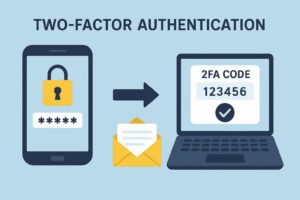
When you log in to any online account, you’re proving your identity—this process is called authentication. Traditionally, the most common method has been using a username and password. But here’s the problem: passwords are weak. They get stolen, guessed, or even leaked in massive data breaches.
That’s why relying only on a single password is like locking your front door with a cheap padlock—it looks secure, but one strong push and it’s wide open.
What is Two-Factor Authentication (2FA)?
Two-Factor Authentication, or 2FA, adds an extra lock to your digital door. It’s a security process where you need two different proofs of identity before gaining access.
Instead of just typing your password, you’ll also need to confirm your identity with something else—like a code sent to your phone or generated by an app.
This makes it much harder for hackers to break in, even if they know your password.
The Importance of 2FA in Today’s Digital World
We live in a time where cybercrime is booming.
From phishing emails to data breaches, hackers are constantly trying to steal logins. For businesses, one compromised account could lead to millions in losses. For individuals, it could mean losing access to your email, bank account, or even your social media profiles.
That’s why 2FA isn’t just a good idea—it’s a necessity.
How Does Two-Factor Authentication Work?
Here’s the simple breakdown:
- You enter your username and password.
- The system asks for a second form of verification.
- You provide a code from your phone, email, or authentication app.
- Only then do you gain access.
Types of Two-Factor Authentication
2FA generally falls into three categories:
- Something You Know: A password, PIN, or security question.
- Something You Have: A smartphone, hardware token, or smart card.
- Something You Are: Biometrics like fingerprints, facial recognition, or voice ID.
The idea is to combine two different categories so that even if one is compromised, the other keeps you safe.
Common Methods of 2FA
Not all 2FA methods are created equal. Let’s explore:
- SMS Verification: A code sent to your phone via text. Simple but vulnerable to SIM-swapping attacks.
- Email-based 2FA: A link or code sent to your email. Better than nothing, but if your email is hacked, you’re in trouble.
- Authenticator Apps: Apps like Google Authenticator generate time-based one-time passwords (TOTP). More secure than SMS.
- Hardware Tokens: Physical devices like YubiKey provide the strongest protection but can be less convenient.
Popular 2FA Apps and Services
Several apps make 2FA easy for everyday users:
- Google Authenticator – Free, simple, widely supported.
- Microsoft Authenticator – Great for both Microsoft and third-party accounts.
- Authy – Cloud backup of codes makes switching phones easier.
- Duo Security – Popular in enterprise environments for strong protection.
Advantages of Using 2FA
Why bother with 2FA? Because:
- It drastically reduces the risk of account takeovers.
- It’s easy to set up—most platforms have it built in.
- It gives peace of mind, knowing your accounts are safer.
Think of it as wearing a seatbelt. You might never need it, but when danger strikes, you’ll be glad it’s there.
Drawbacks and Limitations of 2FA
Of course, nothing is perfect. Some downsides include:
- SMS-based 2FA is hackable via SIM-swaps.
- Losing your phone means losing access to your codes.
- Some users find it inconvenient and skip enabling it.
But honestly, these are minor compared to the risks of having no 2FA at all.
Difference Between 2FA and MFA (Multi-Factor Authentication)
People often confuse 2FA with MFA. The difference?
- 2FA = Exactly two factors (password + one more).
- MFA = More than two factors (like password + fingerprint + hardware token).
MFA is stronger, but 2FA is usually enough for most people.
Industries That Rely Heavily on 2FA
Some sectors can’t afford weak security:
- Banking & Finance: Protecting money and sensitive data.
- Social Media Platforms: Preventing account takeovers and impersonations.
- Cloud Storage & Email Providers: Keeping personal and business data safe.
When your business reputation or billions of dollars are on the line, 2FA is a no-brainer.
How to Enable 2FA on Popular Platforms
Here’s a quick guide:
- Google: Go to Google’s 2-Step Verification.
- Facebook: Settings > Security > Two-Factor Authentication.
- Instagram: Settings > Security > Two-Factor Authentication.
- Apple ID: Settings > Password & Security > Two-Factor Authentication.
Most platforms walk you through it in a few easy steps.
Best Practices for Using 2FA
To get the most out of 2FA:
- Always back up recovery codes in case you lose your phone.
- Use authenticator apps or hardware tokens instead of SMS whenever possible.
- Regularly update your recovery options (like backup email and phone number).
Future of Two-Factor Authentication
Passwords might actually be on their way out. Big tech companies like Microsoft, Apple, and Google are already working on passwordless authentication using biometrics and passkeys.
2FA will evolve into stronger and smoother login experiences. One day, we might laugh at the idea of remembering dozens of complicated passwords.
Leave a Reply